
Google Sheets
Your orders, in your spreadsheet. Automatically.
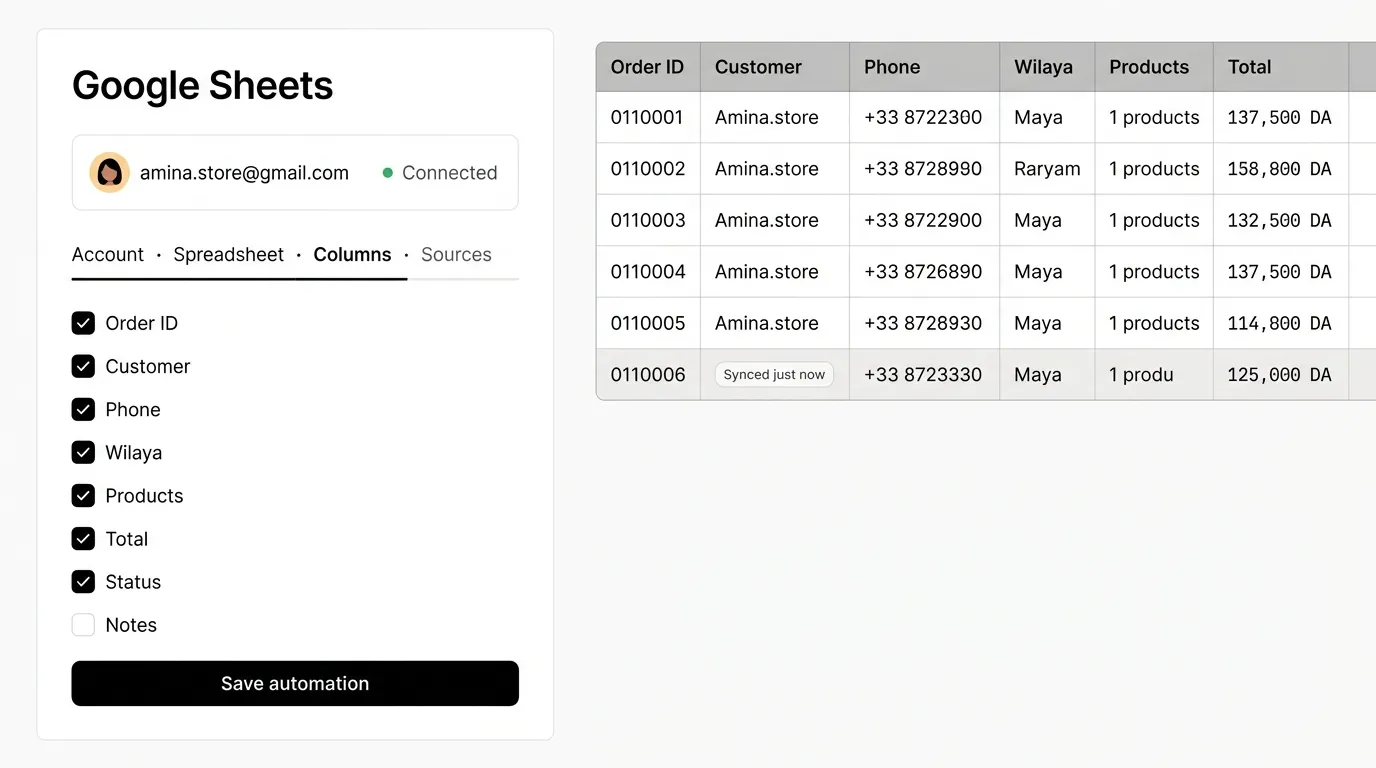
Connect a Google account, choose a sheet and the columns you want — every new order is exported the moment it arrives.
Capabilities
Spreadsheet workflows without copy-paste.
Multiple Google accounts
Connect one or several Google accounts securely with OAuth.
Pick or create a sheet
Choose an existing spreadsheet and tab, or create a new one from Kllix.
Custom columns
Choose which fields to export, rename them and set their order.
Instant sync
New orders are pushed as soon as they're created. Need it now? Hit “Sync now”.
Orders & abandoned carts
Export confirmed orders, abandoned checkouts, or both — per store or landing page.
Multi-product rows
Orders with several products are written cleanly on one row.
How it works
Set up in four steps.
- 01
Connect Google
Authorize your Google account. Tokens are encrypted and you can disconnect at any time.
- 02
Choose the destination
Select a spreadsheet and tab, or create a new spreadsheet.
- 03
Map your columns
Tick the fields you need — customer, phone, wilaya, products, totals, status…
- 04
Choose sources
Pick which stores and landing pages feed this sheet, and you're done.
Explore more features

Your next store is one click away.
Create your Kllix store, connect your delivery company and start taking cash-on-delivery orders today.
No credit card required · Set up in minutes